
Main functions in MI
1. Databuckets
This is where all imported text comments and log entries are stored.
Support normally prepares these databuckets for you.
-
We recommend one databucket per production line.
2. Dashboard
Create charts for stakeholders or teams.
Dashboards help visualize trends, patterns, and key KPIs.
3. Kanban board
Track actions, improvement tasks, and responsibilities.
Notes from dashboards can also be managed here.
4. Analysis
Perform quick, ad-hoc analysis of comments.
MI identifying patterns, recurring issues, or emerging trends.
5. Team History
Search past problems and see what actions were taken.
Ideal for troubleshooting and reusing previously successful solutions.
6. Settings
Manage access rights, activate functions, invite users, and customize your tenant settings (e.g., logo).
7. Theme switcher
Toggle between dark mode and light mode.
8. Language selection
Switch the MI interface to your preferred language.
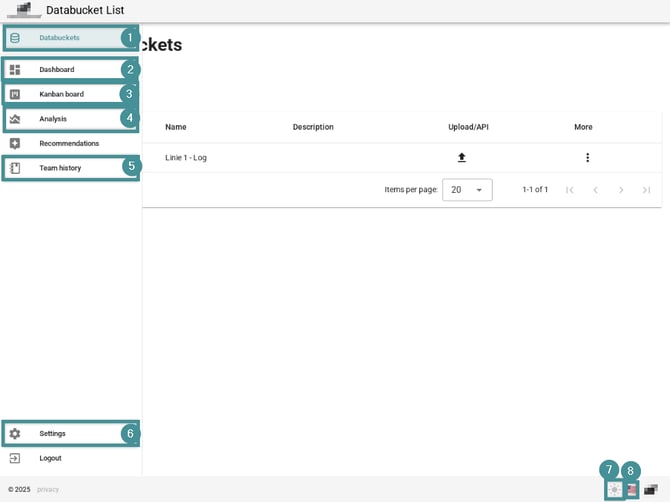
Depending on your role (User, Manager, Tenant Admin) and your subscription, some functions may not be visible.
If you need additional access, contact your Admin.