
Requirements
-
Recipients must have logged in to MI at least once.
-
Charts must be set to Table view for email delivery.
Enable email reporting for a dashboard
-
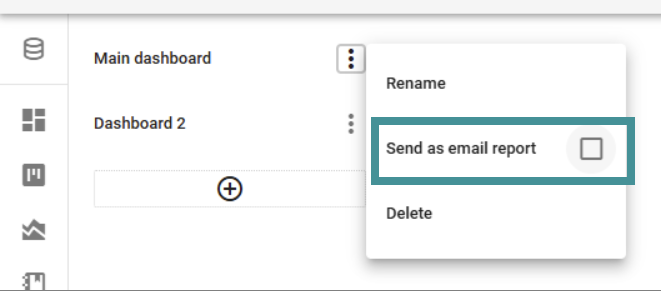
Open the Dashboard menu (three-dot menu).
-
Check Send as email report to activate email reporting for this dashboard.
Once activated, a bar with additional settings will appear.
Configure the email report
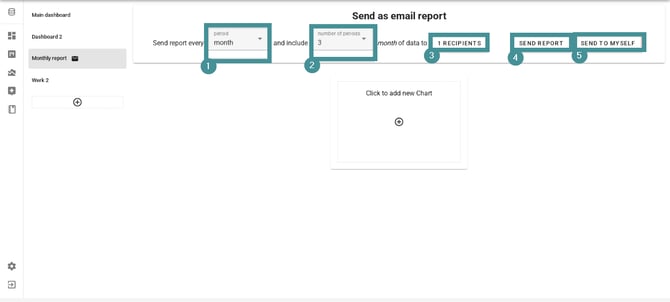
You must fill in the following fields:
-
Frequency
-
How often the report should be sent (daily, weekly, monthly, etc.).
-
-
Date range
-
Example: Last 3 months.
-
-
Recipients
-
Only users who have logged in previously will appear in the list.
-
-
Send report now
-
Sends the report immediately to all recipients.
-
-
Send to yourself
-
Sends a copy to you, even if you are not on the recipient list.
-
Useful for previewing the report or forwarding it with your own comments.
-
Are there other ways to send email reports?
At this time, email reporting is only available through the Dashboard email report function.
If you need a different report format or distribution method, you can export the data and send it manually.
You can also take a screenshot of the diagram.