Problem
You are trying to search for an object using conditions within a selection, but the object does not appear in the results.
Cause
In normal mode, the search results are limited. This restriction can prevent certain objects from being displayed, even if they match the specified conditions.
Solution
To ensure all relevant objects are included in the search results, you need to enable the Advanced Selection Table for the selection.
When this feature is activated, the system displays all available results instead of a limited subset, making it possible to find the object you are looking for.
How to Enable Advanced Selection Table
-
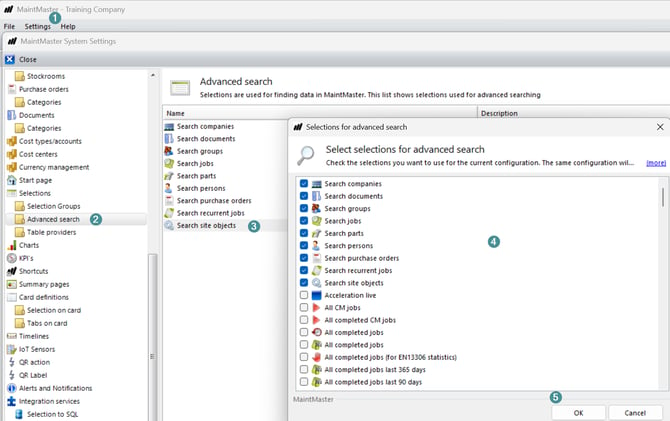
Open "System Settings"
-
Go to:
Selection → Advanced Search → Search Site objects
-
Edit the configuration
-
Select the selection(s) where this function should be enabled
-
Click "OK" to save
After enabling this setting, repeat your search—the object should now be visible in the results.