
A notification is triggered for the user when a new entry/row is added to a selection. Therefore, you need to first create a selection. Sometimes, you'll need to adjust the conditions to ensure notifications are triggered at the right time.
Steps to Create Alerts and Notifications:
1. Open "System Settings."
2. Navigate to "Alerts and Notifications."
3. Click on "Add."
4. Give the notification a name.
5. Add a description.
6. Go to the "Rules" tab.
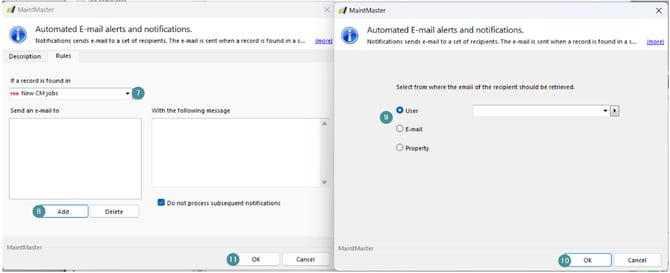
7. Pick the selection from which you want to receive notifications.
- In this example, we use "New CM jobs," so a notification is sent when a new CM job pops up in the selection.
- If you instead want to be notified of upcoming jobs, you will need to create a selection with condition for dynamic date.
8. Click on "Add."
Specify who will receive the alert/notification and how the system selects contact information.
- For each additional person, click "Add" again.
User: Select who will receive the notification. The system will send an email to the address listed on that user's Person Card.
E-mail: If the recipient uses a different email than the one associated with their Maintmaster account, select "E-mail" to specify an alternative (e.g., a personal email address).
Property: If a person responsible for a particular selection or category needs to be notified, choose this option.
8. Click "OK."
9. Click "OK" again to finalize the alert/notification.
Please note, alerts and notifications only function in live systems (not in sandboxes), and it may take up to 24 hours for a new alert/notification to be properly activated.
Selections with conditions that check the logged-in user or the logged-in user's group do not work for targeting as it only shows records if a user checks the selection that triggers the condition.
If this box is ticked, the system will not attempt to process the underlying notifications if the condition specified in this notifications is met.
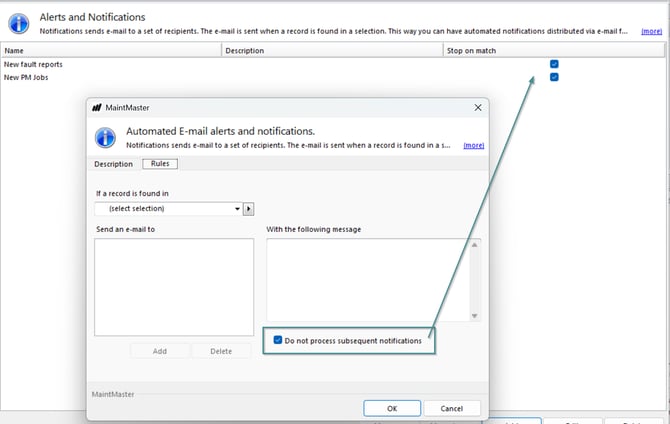
Note, How alerts work for "time to order"?
An alert is sent every time a new row appears in the selection, not per article. The same article can trigger several alerts, because it can be on the list for different reasons, and each reason is its own row.
An article can land in "time to order" for three reasons:
- It has reached its order point.
- It will be used on upcoming jobs.
- It has been requested by a user.
These show as separate rows in the selection and each one generates its own alert.
Good to know:
- A newly created alert only emails about rows that appear after it was created, not about rows already in the selection.
- Where the email is sent depends on the recipient type: User and Property (pointing to a person) use the address on the person card, a Property that is an email field uses that address and E-mail uses the address you typed in.