
To add a new selection group to the menu field you do two things: create a new selection group and add at least one selection to it. A selection group on its own stays hidden until it contains something.
Step 1: Create the selection group (the category)
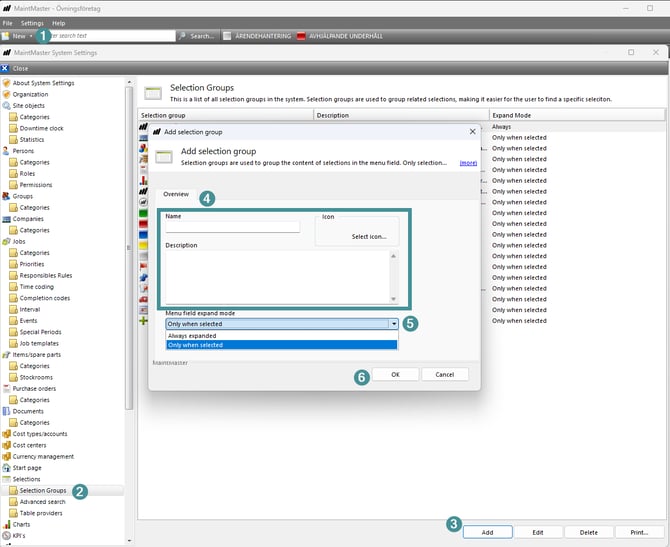
- Open System settings under settings
- Go to Selections → Selection Groups
- Click "Add"
- Enter a Name. It must be unique. Optionally add a description, pick an icon, and set a Sort order to control where the group appears in the list
- You can also set Expand mode to decide whether the group is always expanded or only when selected
- Click OK.
NOTE, The selection group won’t appear in the menu field yet. This is expected. An empty selection group is hidden. Continue to Step 2.
Step 2: Add a selection to the selection group
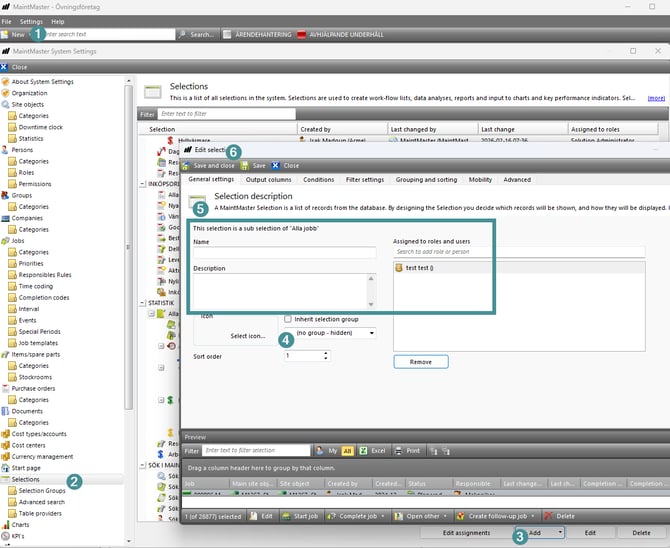
- Go to System settings under settings
- Choose Selections
- Create a new selection or sub-selection, or open an existing one to edit it
- On the General settings tab, find the selection group dropdown, untick inherit selection group and choose your new group
- Make sure the selection has a name, maybe a description and that it is assigned to a role that your users belong to, otherwise it won’t be visible to them
- Click Save and close.
Notes:
- Leave Inherit selection group unticked so the selection uses the group you pick. If you tick it, the selection instead follows whatever group its parent selection belongs to.
-
As soon as the selection group contains at least one selection that the user is allowed to see, the group appears in the menu field with the selection listed under it.
Why a new selection group sometimes “doesn’t show”
A selection group only appears in the menu field when both of these are true:
- It contains at least one selection, and
- That selection is visible to the current user (assigned to one of their roles).
So if you created a category and nothing shows up, it’s almost always because the group is still empty or its selection isn’t assigned to your role.