
Order Detail \ Production Run
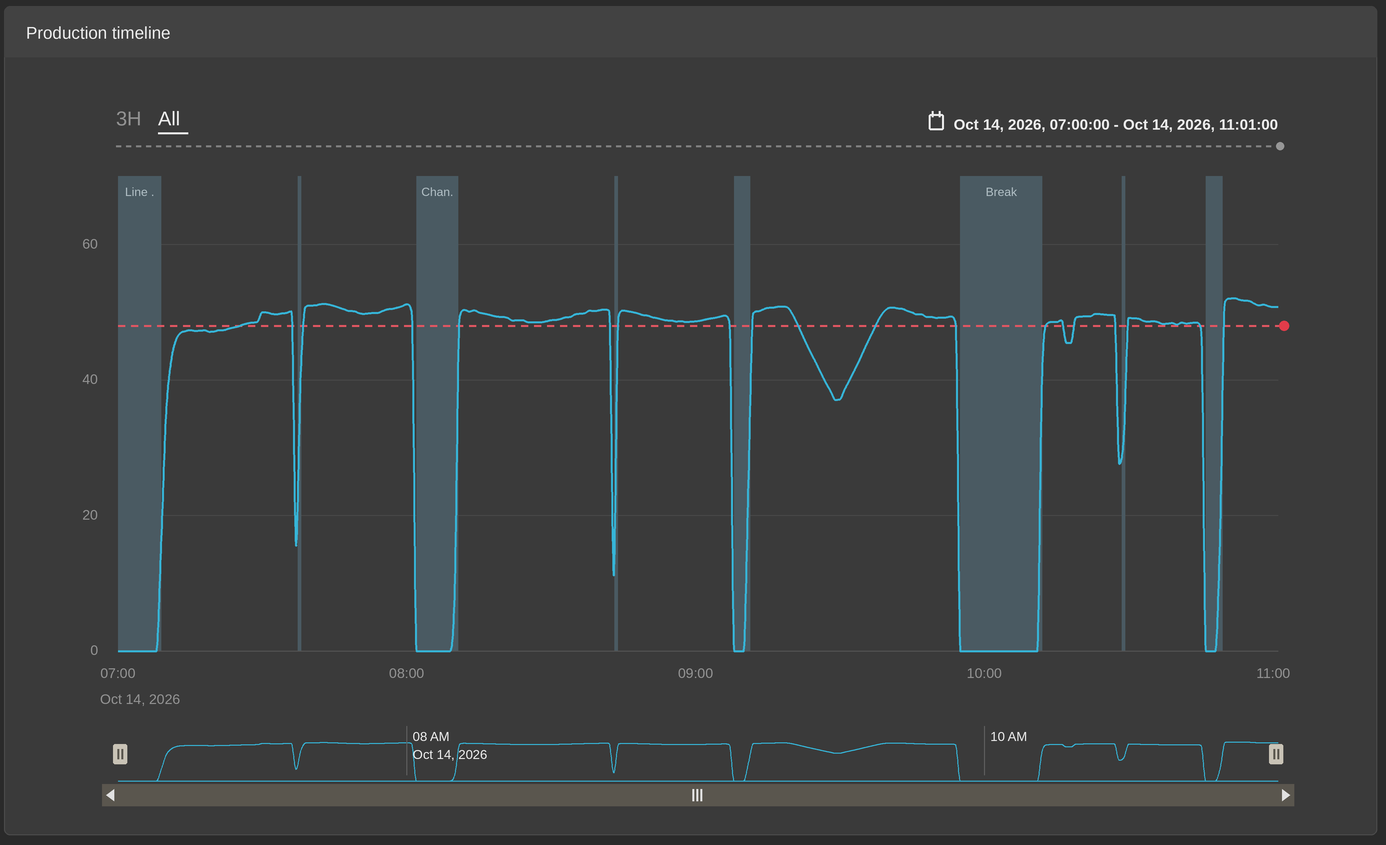
On the Order Detail or Production Run screen in Maintmaster OEE you see two things together: a production curve, and coloured blocks for each recorded stop. They sometimes look like they disagree. A block can sit where the curve still looks healthy or the curve can dip without reaching zero. Both are normal. They measure the same production in two different ways.
The curve is per minute
Each point on the curve is the quantity counted since the previous point, which is one minute earlier. The line between the points is drawn smoothed so it shows a shape rather than an exact trace. A short stop sits inside a single minute. That minute still contains the output produced before and after the stop, so the curve dips a little instead of falling to zero.
The stop is per second
A stop is recorded from the machine signal, not from the curve. It can come from an alarm on the machine. Where no alarm is connected, a stop is detected by counts going absent instead. The system measures the time since the last count and records a stop once that gap passes the limit set on the work centre.
The limit is set per work centre so it differs between lines and sites. If it is set to 30 seconds, a block appears only once the line has gone 30 seconds without a count. So a block on the chart represents a real gap in production, not a brief pause.
You can read the value in Maintmaster OEE Manager, under OPC Config and then OPC Counters. The field is Machine No Alarm Time Out and it is in milliseconds so 30000 means 30 seconds. Administrator access is needed to see it.
Read the record, not the picture
The curve is there to show the shape of the shift. When you need exact figures, open Downtime Detail on the left or top menu for the same order. Every block on the chart has its own row there with its start, end and duration. Those are the values the OEE figures are built from.
FAq: Questions we are often asked
A block appears where the line looks like it was running. Is that an error?
No. The curve is accurate to the minute so a stop of under a minute does not always show as a visible dip.
Why does the curve not reach zero during a stop?
Because that minute still holds the output produced around the stop. Only a stop lasting a full minute or more brings the point to zero.
Can I stop short stops appearing?
Raising Machine No Alarm Time Out means fewer short stops are recorded. It applies from the moment it is changed and it does not alter past orders. Consider it carefully, because time that is no longer recorded as downtime appears as Rate Loss instead and Rate Loss carries no reason code. See What is Rate Loss?
The block does not sit exactly on the dip. Why?
The block and the curve are drawn from different sample points, so they will not always align exactly. Compare the durations in Downtime Detail rather than the positions on the chart.