
When to use this
Use this guide when you need to add a new administrator or revoke administrator access from an existing administrator in the system.
What is an administrator?
An administrator can manage:
-
System settings
-
Configurations
-
Users and permissions
Add a new administrator
1. Click your name in the top-right corner.
2. Select "System settings".
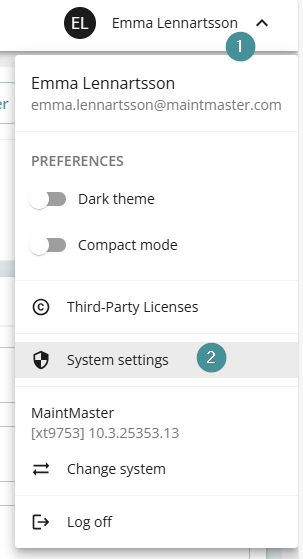
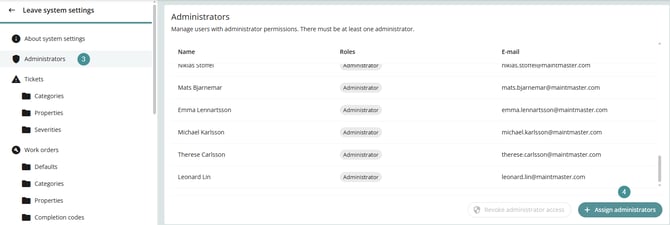
3. Open "Administrators".
4. Click "+ Assign administrators"
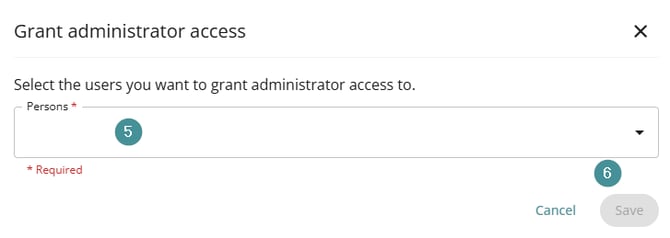
5. Select the user you want to grant administrator rights to.
6. Click "Save
Revoke administrator access
1. Click your name in the top-right corner.
2. Select "System settings"
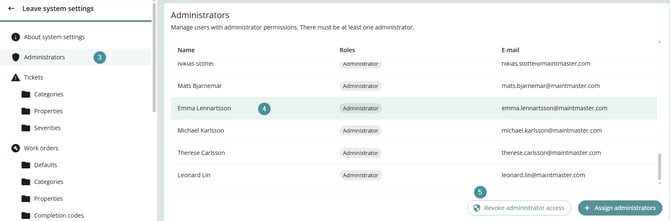
3. Open "Administrators"
4. Select the administrator you want to remove.
5. Click "Revoke administrator access"
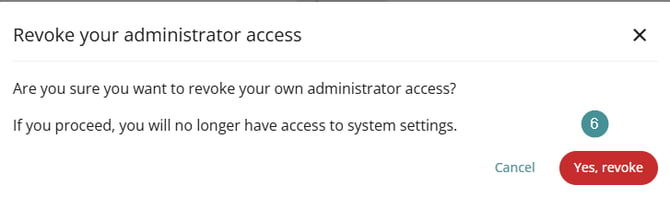
6. You will be prompted to confirm your action. Select Yes, revoke to proceed
-
The system must always have at least one administrator.
-
You cannot remove administrator access if it would leave the system without an administrator.