When to use this
Use these steps when you need to customize the sidebar menu in CMMS 10, such as editing an existing menu item, adding a child menu item, or removing a menu item.
Edit the sidebar menu
1. Open the sidebar navigation menu.2. Scroll to the bottom of the sidebar.
3. Click Edit menu to enter editing mode.
4. Hover over the menu item you want to modify.
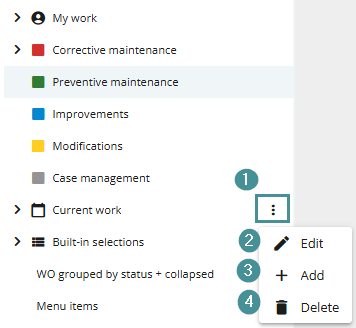
5. Click the context menu button that appears to the right of the menu item (1).
6. Choose the action you want to perform:
- Edit (2) – Change settings such as the icon or permissions.
- Add (3) – Add a child menu item under the selected menu item.
- Delete (4) – Remove the menu item.
7. Click Finish editing when you are done to save your changes.