
Case Scenario
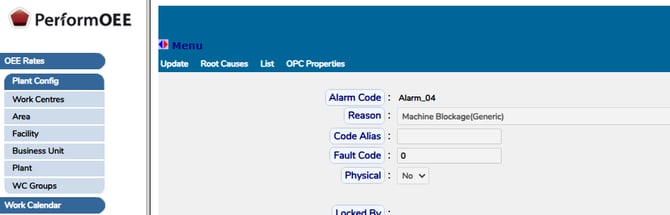
A downtime reason was added by mistake (for example, a duplicate or misspelled loss code), then inactivated and removed from all work centres. Even so, it keeps appearing as an automatic downtime category on some lines. In the examples below the unwanted reason is shown as “PLC Filler Nozzle Clogged(Filler)” and the goal is to make those alarms register as the correct reason instead, shown here as “Machine Blockage(Generic)”.
Why This Happens
This is expected behaviour. The downtime reason that fires automatically when a PLC alarm triggers is configured per work centre, on the OPC Alarm Codes screen in OEE Manager. Inactivating a loss code or removing it from the work-centre reason lists, does not change these alarm mappings. The retired reason therefore keeps appearing until the mapping itself is changed.
One added detail to watch: the same reason is often mapped under a different alarm number on each line (for example, Alarm_04 on one line and Alarm_01 on another). The change therefore has to be made line by line.
How to Remap the Reason
The fix is to open the affected alarm on each line and switch its Reason to the reason you want it to record as (shown here as “Machine Blockage(Generic)”). There is no need to delete anything. A line normally has several alarms pointing at the same common reason, so changing the Reason is the standard, supported approach.
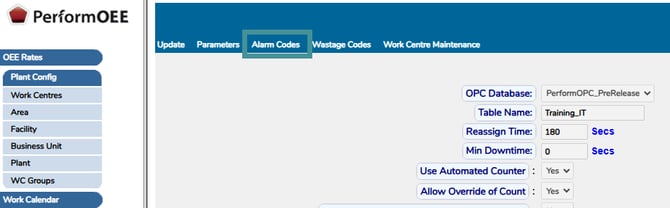
1. In OEE Manager, open "Plant Config -› Work Centres" and open the line you are fixing. On the Work Centre Maintenance screen, click “OPC Properties” on the top toolbar.
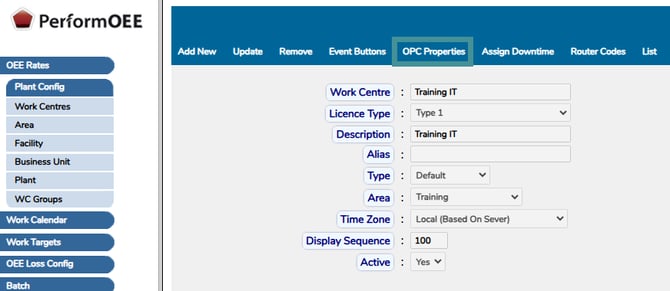
2. On the OPC Properties screen, click “Alarm Codes” on the top toolbar.
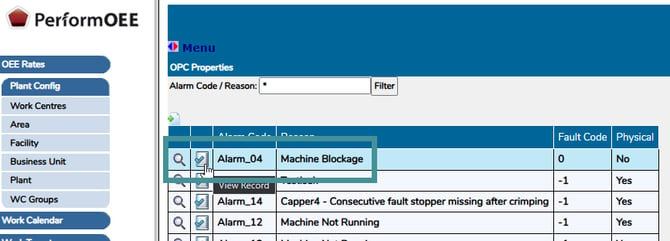
3. In the “Alarm Code / Reason” filter box, type the reason or alarm code and click "Filter". Find the row whose Reason is the unwanted loss code and click the "Edit (view record)" icon at the start of that row.
4. In the "Reason" dropdown, select the correct reason (shown here as “Machine Blockage(Generic)”), then click “Save”.
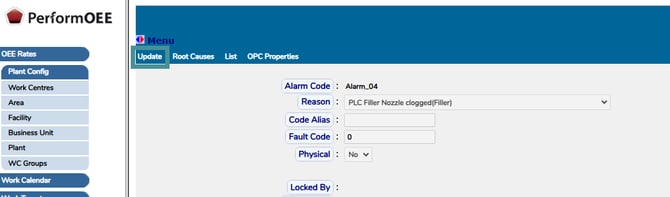
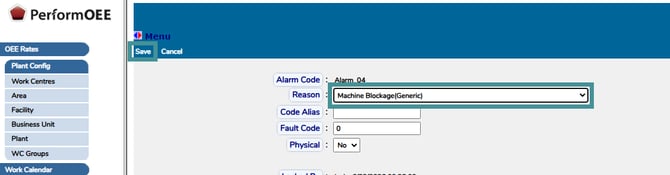
5. Repeat steps 1 to 4 on every affected line. Because the alarm number can differ per line, check the alarm code on each one. For example:
| Line (Work Centre) | Alarm code (example) | Current reason (remove) | New reason (set to) |
|---|---|---|---|
| Line A | Alarm_04 | PLC Filler Nozzle Clogged(Filler) | Machine Blockage(Generic) |
| Line B | Alarm_01 | PLC Filler Nozzle Clogged(Filler) | Machine Blockage(Generic) |
| Line C | Alarm_02 | PLC Filler Nozzle Clogged(Filler) | Machine Blockage(Generic) |
Conclusion
An automatic downtime reason is controlled by the alarm mapping on each work centre, not by the reason list:
- Reason list / inactivating a code controls where a reason can be picked manually.
- OPC Alarm Codes mapping controls which reason a PLC alarm creates automatically.
To stop a retired reason from triggering automatically change its mapping on the OPC Alarm Codes screen for each affected line. Only the unwanted loss code is changed; any correctly configured reason is unaffected.