
The two screens answer different questions, so both numbers are correct.
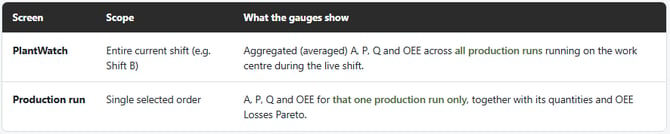
- PlantWatch shows shift level OEE, aggregated over all orders that ran on the work centre during the shift.
- The production run view shows OEE for a single run only.
- Click the work centre in PlantWatch to open the current run.
- Use the Option menu to find and open earlier runs from the same shift.
Example:
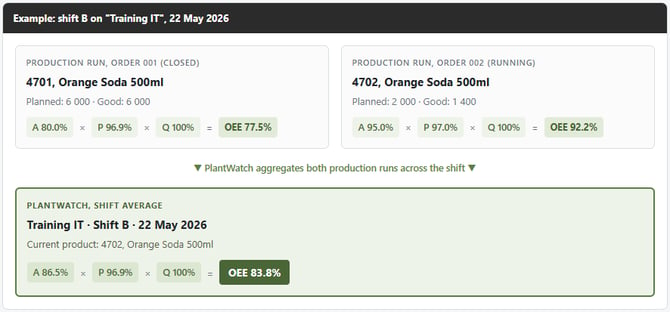
During a shift B one order reached 77.5% OEE and the next production run is currently at 92.2%. PlantWatch will show 83.8%, the shift level result of both orders together, which matches neither individual run.
Behaviour Explanation
This is expected behaviour. The two screens are designed to show OEE at different scopes:
In the example above, two orders ran on the "Training IT" work centre during shift B. Order 001 finished with an OEE of 77.5 %, while order 002 is currently running at 92.2 % OEE. Plant Watch averaged both orders together, producing a shift-level OEE of 83.8 % - A number that does not match either individual Production run view.