Follow the troubleshooting guide below to verify power, connectivity, and configuration before contacting support.
-
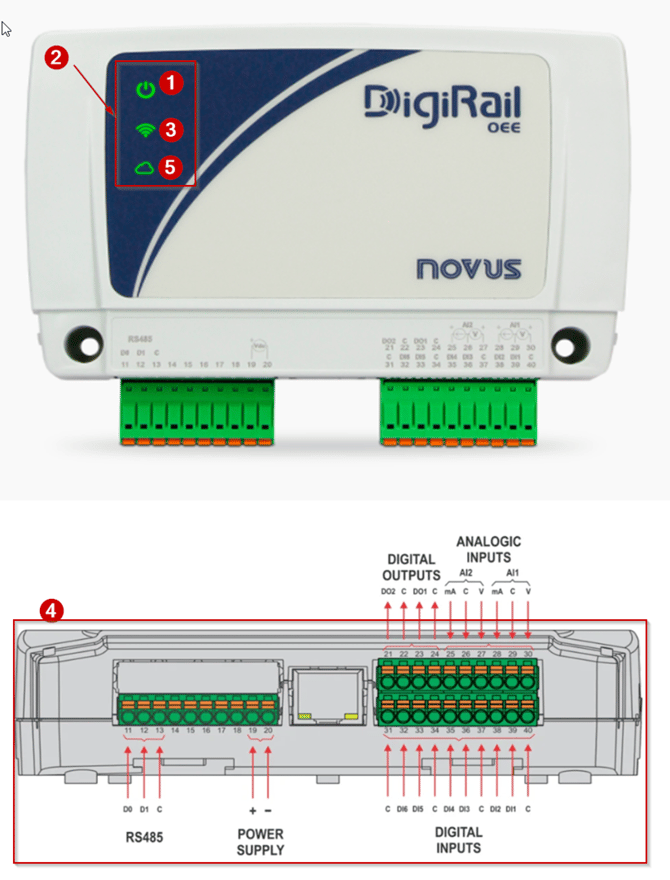
Check the power supply. Ensure the DigiRale box is connected to a power source and turned on.
-
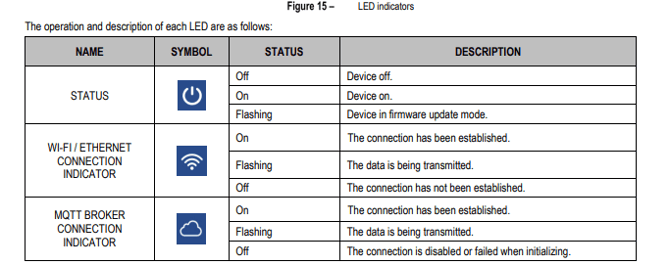
Verify the status indicators. Confirm that the device shows three green lights.
-
Verify the network connection (ETH devices only). Ensure the Ethernet/network cable is properly connected and working.
Common issues:
- Firewall restrictions
- Network switch problems (if the connection passes through a switch, faults in the switch or upstream network may cause issues)
Note: These issues may also cause the Cloud icon not to appear.
-
Check the wiring configuration. Ensure the wiring follows the correct setup instructions and is connected to the appropriate Digital Inputs ("DI1", "DI2", "DI3", "DI4", "DI5", "DI6").
-
Verify firewall settings. Ensure port "8883" is open in your company firewall to allow secure MQTT communication.
If all checks have been completed and the issue persists, contact Support and provide details of the steps you have already verified.