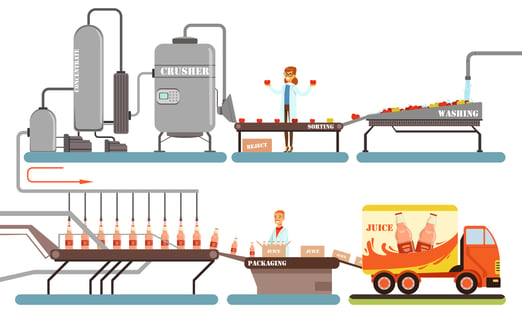
Example: Juice Factory Production Line
The Image above illustrates a bottling production line for apple juice.
-
Apple Sorting:
- After washing, apples are sorted.
- Apples that do not meet the required standards are manually rejected by Jane and placed in the "Reject" box.
-
Juice Extraction (Crusher Equipment):
- The Crusher extracts juice, and the remaining apple solids are discarded as waste (or scrap).
-
Bottling Process:
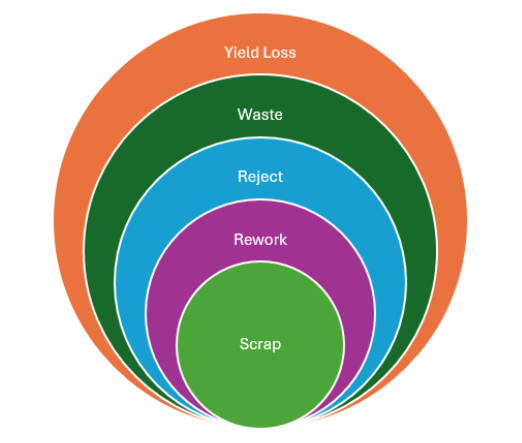
Various scenarios can occur during the filling and labeling of juice bottles:- Broken Bottle → Reject (not usable and must be discarded).
- Underfilled Bottle → Rework (can be reintroduced into the production line and filled correctly).
- Overfilled Bottle → Rework (can be reprocessed to meet the correct filling level).
- Incorrect Label → Rework (the incorrect label can be removed, and the bottle can be reintroduced).
Since reworks remain within the production line, they may or may not be counted again by a sensor.
Tracking Yield Loss in OEE
The system allows manual and automated tracking of yield loss:
- Manual Entry: Operators, such as Jane, can manually input the number of rejected apples.
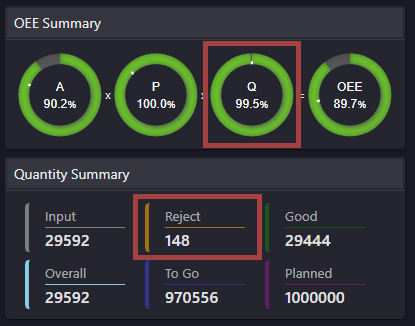
- Automated Detection: Sensors or push arms can detect and count rejected products. Each activation of the push arm or sensor registers as a reject and is recorded under the Q (Quality) metric.
Importance of Tracking Rejects and Waste
- Cost Analysis: Monitoring rejects helps identify financial losses due to unsellable products.
- Supplier Evaluation: If a high number of broken bottles is recorded, switching to a more durable glass or a different supplier might reduce losses.
- Waste Management & Recycling: If waste/scrap is significant, it may be resold to composting companies. Tracking waste over time (weekly, monthly, etc.) helps assess opportunities for sustainable practices and cost recovery.
Add a Manual Yield Loss
1. Open the Work Centre.
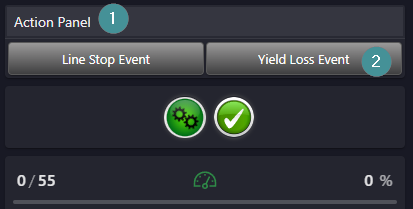
2. Go to the Action Panel.
3. Click on “Yield Loss event”.
4. Select an appropriate category.
5. Select an reason e.g. Overweight Rejects. Underweight Rejects
6. Insert the number of units that have been rejected.
7. Save
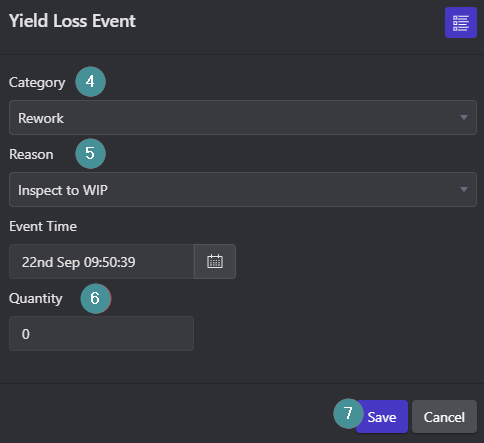
When you add a Yield Loss value, both the Quality Target and the amount of Rejects adjusts automatically.