
-
How OEE rate is used.
-
Who sets the OEE rate?
-
How to determine the correct OEE rate.
- Change an OEE rate for a product.
-
-
Backdate and update OEE rates.
How OEE rate is used
-
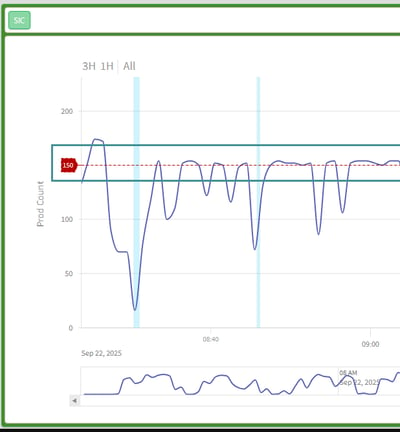
The OEE rate is displayed in the Order Detail screen as a red dotted line.
-
It represents the target production speed and is used to calculate performance and OEE results.
Who sets the OEE rate?
As an Administrator, you define the production speed by specifying:
-
Units per minute, or
-
Units per hour
This value reflects the expected output of the machine under normal operating conditions.
How to determine the correct OEE rate
-
Use the machine manufacturer’s documentation as an initial reference, if available.
-
If the exact capacity is unknown, set an estimated value and adjust it later.
-
As the system collects real production data, analyze actual performance and fine-tune the OEE rate to reflect realistic targets.
An accurate OEE rate ensures reliable OEE calculations and meaningful performance comparisons.
Change an OEE rate for a product
To modify a product’s OEE rate going forward:
1. Open to system settings → Manager
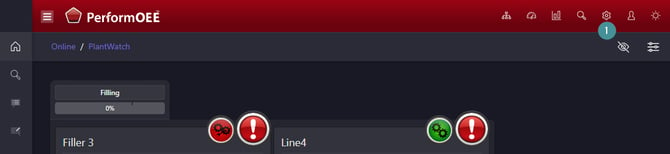
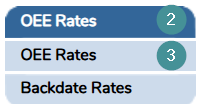
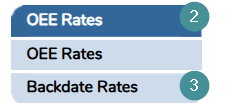
2. Go to "OEE rates".
3. Open "OEE rates".
4. Select the product.
5. Update the OEE rate.
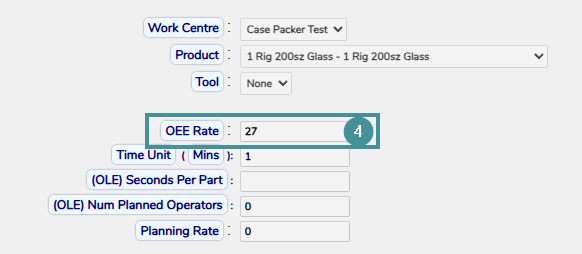
5. Click "Save".
Backdate and update OEE rates
If you adjust an OEE rate, you may need to apply the change to past data.
Steps to backdate OEE rates
1. Open "Manager".
2. Navigate to OEE rates.
3. Click "Backdate Rates".
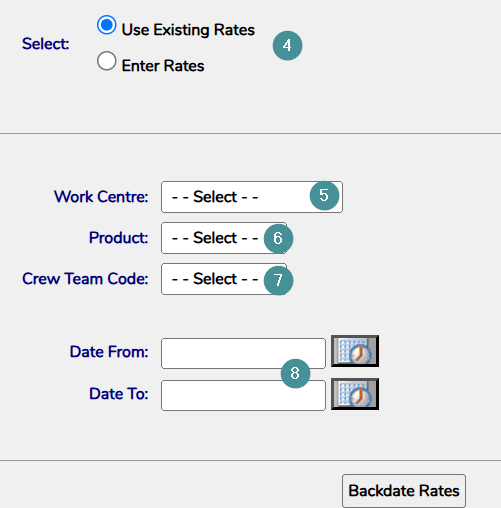
4. Choose whether to:
- Use the rate from the OEE rate settings, or
- Enter a rate manually.
5. Select the Work Centre.
6. Select the Product.
7. Apply any additional relevant filters.
8. Choose the date range for the update.
9. Click Backdate Rates to confirm.
Keeping OEE rates up to date ensures that performance tracking reflects actual production capability and supports continuous improvement.