
When to use OEE rate import
-
Adding OEE rates for many products
-
Updating existing OEE rates in bulk
-
Ensuring consistent configuration across Work Centres
The import works in the same way as product imports.
Required columns
The following columns must be filled in:
-
WorkCentre
-
Product
-
OEERate
-
TimeUnit
All other columns must remain in the file but can be left blank.
Important
-
The Product column is the unique identifier.
-
The product name must exactly match the product name in the system (or in a previously imported product file).
-
If the names do not match, the OEE rate will not be linked to the product.
Download the OEE rates template
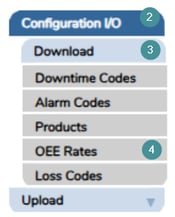
1. Open Manager
2. Go to the menu and select Configuration I/O.
3. Choose Download.
4. Click "OEE Rates".
5. Click "Download" to get the OEE Rates import template.
Fill in the template
Open the downloaded file and enter the required information:
-
Column A: WorkCentre
-
Column B: Product (must exactly match the product name in the system)
-
Column C: OEERate
-
Column D: TimeUnit
Leave all other columns unchanged. Unless there is a reason for changing the values on the other columns.
Save the file
Excel (from version 2026.1)
-
Go to File → Save As
-
Select Excel Workbook (*.xlsx)

Upload the file
1. Open to Manager
2. Go to Configuration I/O.
3. Select Upload
4. Choose “OEE Rates.”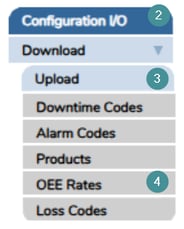
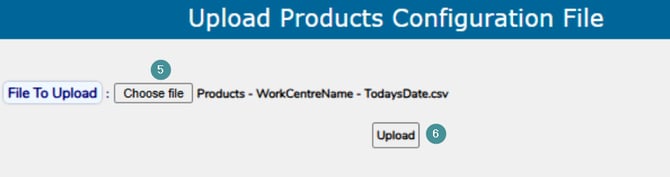
5. Choose your file
6. Click “Upload”
Notes
-
The same template can be reused to update existing OEE rates by re-uploading the file.
-
Always verify product names and Work Centre values before uploading to avoid import errors.
If you need assistance, contact Maintmaster Support.