
When to use this
Use this article when you want to understand what an asset is, how assets are organized in the Asset Tree, and how to determine what should be registered as an asset versus a spare part.
What is an Asset?
Assets represent the physical items or structures that are maintained in the system. If you have previous experience from our CMMS 8, assets are called site objects in CMMS 8
Examples of assets include:
-
Machines
-
Machine components
-
Buildings
-
Departments
-
Vehicles
The Asset tree
Assets are organized in the Asset tree, which is a hierarchical structure made up of branches. Every asset in CMMS 10 is located somewhere within this tree.
The structure is important because it:
-
Controls the order of maintenance rounds
-
Helps users navigate using picture navigation
-
Makes it easier to locate the correct asset in the system
What should be an asset?
An asset is typically something that can be maintained or repaired.
However, when building your structure, you must decide where the boundary lies between:
-
Assets
-
Spare parts
General guideline
A common rule is:
-
Assets are items that can be repaired.
-
Spare parts are items that are typically replaced.
For example, a machine may be an asset, while smaller replaceable components used for repairs may be registered as spare parts.
Defining this boundary incorrectly can make maintenance tracking and spare part management more difficult.
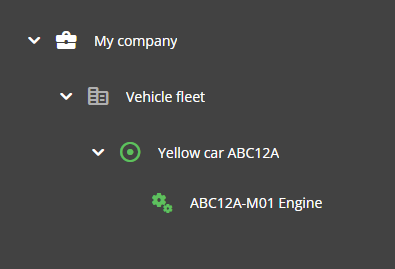
Example: Vehicle fleet structure
If you were registering a vehicle fleet in CMMS 10, the Asset tree could be structured with vehicles and related components arranged in a clear hierarchy.
This structure helps users quickly locate the correct vehicle or component within the system.
Naming Assets
To make assets easier to find in the system, it is often helpful to assign a nickname that users commonly use.
For example, users might search for:
-
“Yellow car”
Additional technical information can then be stored using:
-
Designation
-
Properties
These can include details such as:
-
Registration number
-
Technical specifications
-
Other identifying information
Using familiar names helps reduce the barrier between how users talk about equipment and how they search for it in the system.
Additional guidance
For more detailed recommendations on structuring the Asset tree, see the Maintenance Manual.