
When to use this
Use bulk edit when you:
-
Need to update multiple work orders at the same time.
-
Want to assign, reassign, or update priorities in batches.
-
Are working from a selection view of work orders.
Bulk edit work orders
Steps
-
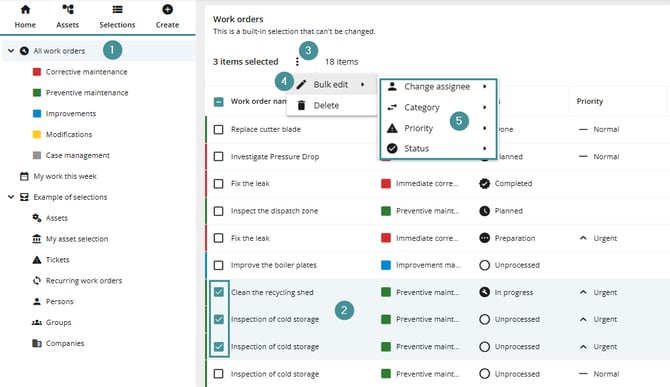
Go to a work order selection view.
-
Select multiple work orders by marking the rows.
-
Open the context menu.
-
Click Bulk edit.
-
Choose the field(s) you want to update.
-
Confirm your changes when prompted.
Available bulk edit options
You can update the following fields:
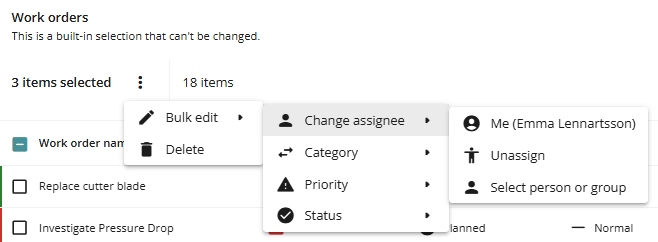
Assignee
-
Assign to yourself.
-
Unassign current assignee.
-
Assign to another person or group.
Category
-
Change the work order category.
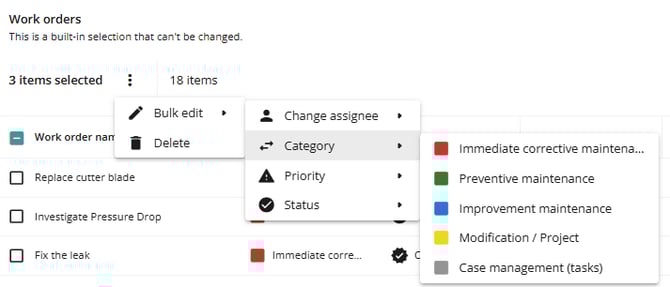
Changing category may remove existing category-specific properties.
If the new category does not include the same properties, the original values will be permanently lost and cannot be restored.
Priority
-
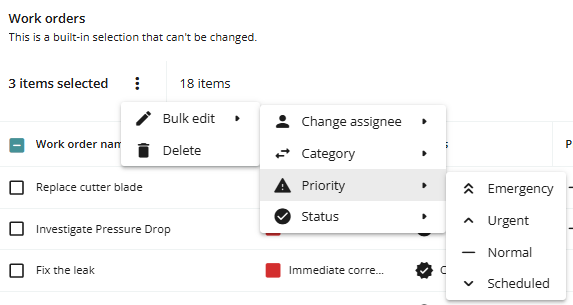
Update priority (e.g., set to Urgent).
-
A confirmation prompt will appear before applying the change.
Status
-
Change the status of selected work orders.
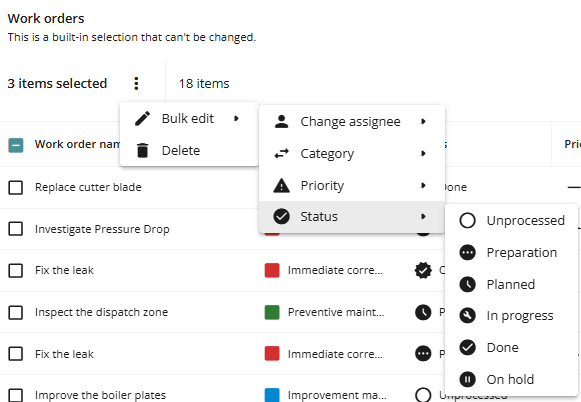
Work orders with status Completed cannot be modified and will not be included in bulk edits.
Example
If you select three work orders and change their priority to Urgent, all selected work orders will be updated after confirmation.
Troubleshooting
I cannot bulk edit some work orders
-
Ensure the work orders are not in Completed status.
-
Verify that you have permission to edit them.
Changes did not apply
-
Check if you confirmed the action in the prompt.
-
Refresh the view to verify updates.